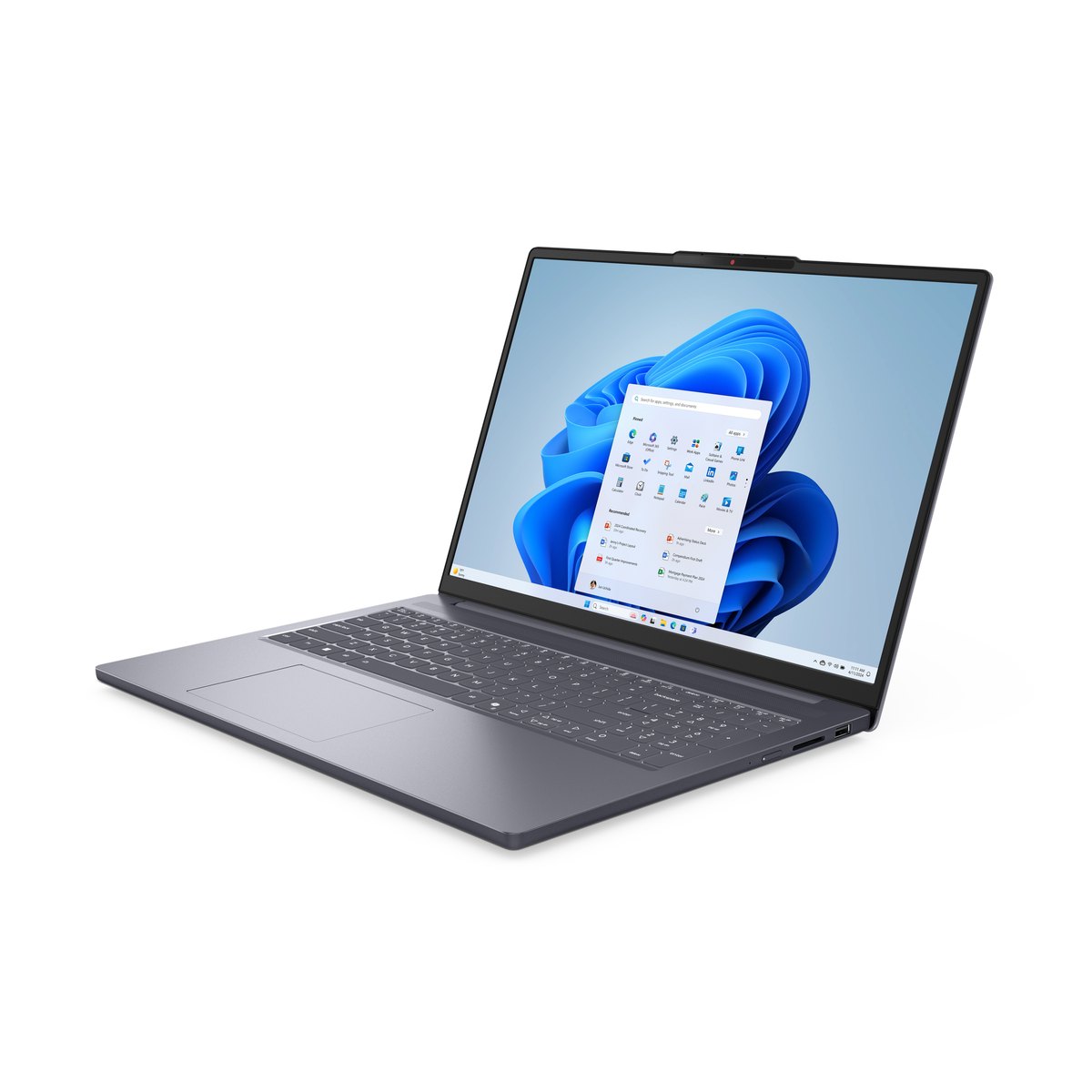
Lenovo IdeaPad Slim 3 16 (Core i5, 16GB, 512GB)
A roomy 16-inch laptop for browsing, Office, documents and video calls. A tall 1920×1200 IPS screen, a capable 8-core Intel processor and 16GB of memory make it a strong everyday pick. Check the seller, warranty and Office terms before buying.
Quick verdict
Yes, for everyday home and office work. The Lenovo IdeaPad Slim 3 16 in this configuration pairs a tall 16-inch screen with a full-power Core i5-13420H, 16GB of memory and 512GB of storage, which is plenty for browsing, Office and video calls. Skip it if you need a light laptop, a bright or color-accurate screen, or gaming graphics, and check the seller, warranty and Office terms before buying.
- Best for:
- Browsing, Office, documents and video calls on a roomy 16-inch screen.
- Watch out:
- Third-party seller — check the Office licence and warranty first.
Amazon US listing and availability checked October 28, 2026. Prices and stock can change.
Reviewed October 7, 2026 · How we review
Our Take
For someone who mostly works in a browser, Word, Excel, email and video calls, this configuration gets the important things right. The 16-inch IPS screen is large and tall, so you see more of a document or spreadsheet without scrolling. The Core i5-13420H is a full-power laptop chip, not a low-power one, so everyday work has headroom. 16GB of memory is a comfortable amount for keeping many browser tabs and Office files open together, and 512GB of storage holds documents and everyday apps without constant clean-up. It isn't a premium machine. The screen is a mid-range panel, the graphics are integrated, the keyboard isn't backlit on this listing, and at about 3.7 lb it's a desk-and-backpack laptop rather than an ultraportable. For the intended buyer, those trade-offs are reasonable. The bigger caveat is the listing itself: it's sold by a third-party reseller, it advertises "Office 365" without saying what licence or for how long, and its 40GB maximum-memory figure conflicts with Lenovo's own spec sheet. Confirm those details before you buy.
Specs (This Configuration)
- Model
- Lenovo IdeaPad Slim 3 16 (16IRH10 platform per Lenovo PSREF); exact machine-type model number not shown on the listing
- Processor
- Intel Core i5-13420H — 8 cores (4 performance + 4 efficient), 12 threads, up to 4.6GHz, 12MB cache
- Memory
- 16GB DDR5, running at DDR5-4800
- Storage
- 512GB M.2 PCIe 4.0 NVMe SSD
- Display
- 16-inch IPS, 1920×1200 (16:10), anti-glare, 300 nits, 45% NTSC, 60Hz, non-touch
- Graphics
- Intel UHD Graphics (integrated)
- Ports
- 2× USB-A (5Gbps), 1× USB-C (5Gbps, charging and DisplayPort), HDMI 1.4, SD card reader, headphone/mic jack, round power connector
- Wireless
- Wi-Fi 6, Bluetooth 5.2 (per listing)
- Webcam
- 720p with privacy shutter, dual microphones (per listing)
- Keyboard
- Full size with numeric keypad and Copilot key; not backlit (per listing)
- Software
- Windows 11 Home
- Weight
- About 3.7 lb (1.68 kg), Lenovo's starting weight for IPS models
- Color
- Luna Grey
The screen: more room for documents and web pages
The screen is the main reason to choose this laptop for office work. It's 16 inches with a 16:10 shape, so at 1920×1200 it shows 120 more rows of pixels than a common 1920×1080 laptop screen. In practice, that means a few more lines of a document, more rows of a spreadsheet and more of a web page before you have to scroll.
It's an IPS panel, which keeps colors and contrast steadier when you look from an angle — useful when you share the screen with someone beside you or don't sit squarely in front of it. Lenovo lists it as anti-glare, which helps with reflections from overhead lights.
Lenovo rates it at 300 nits and 45% NTSC color. That's fine for documents, browsing and video calls indoors, but it isn't a bright, wide-color screen: it isn't a good choice for color-critical photo work, and we wouldn't expect it to be comfortable in direct sunlight. Lenovo sells the same model with a brighter OLED screen; this isn't that version.
The processor: more than Office needs, which is the point
The Core i5-13420H is one of Intel's H-series laptop chips, which are designed for more sustained performance than the low-power U-series chips found in many thin budget laptops. Lenovo lists it with 8 cores (4 performance and 4 efficient), 12 threads, a top speed of 4.6GHz and 12MB of cache.
Basic Office work, email and web browsing don't need this much processor. The benefit is headroom. A video call while a dozen tabs are open, a large spreadsheet recalculating, a long PDF export or a batch of photo edits all have room to run without the whole system bogging down.
We haven't tested this laptop, so we don't quote benchmark scores, battery life or fan noise. H-series chips can draw more power under heavy loads than low-power chips, so if long battery life is your top priority, compare battery capacity and independent battery tests before buying.
Is 16GB of RAM enough for browsing and Microsoft Office?
Yes, for most people. Memory (RAM) is the laptop's short-term workspace. More of it lets you keep more programs, browser tabs and files open at once without slowing down. 16GB is a comfortable amount for normal multitasking: Word, Excel, Outlook, a browser full of tabs and a video call at the same time.
More memory is worth considering if you regularly work with very large spreadsheets or databases, run virtual machines, or do sustained photo, video or design work. Lenovo's spec sheet lists two memory layouts for this model, with a maximum of 16GB or 24GB depending on the layout, and the listing doesn't say which one this unit uses. So don't count on upgrading it later. The listing's 40GB maximum doesn't match Lenovo's documentation.
Storage: 512GB for documents and apps
Storage is different from memory. It's where Windows, your apps and your files are kept permanently. A 512GB SSD is a practical size for everyday use: Windows, Office and a browser use a modest share of it, and documents, spreadsheets and PDFs take up little space. It fills faster if you keep large photo or video libraries locally, though cloud storage or the SD card reader can help.
The drive is an NVMe SSD on a PCIe 4.0 connection, which means faster startup and app loading than an old spinning hard drive. We don't quote a specific speed, because the listing doesn't name the exact drive. Lenovo's spec sheet also lists a second M.2 slot for adding a drive yourself, which is a useful option if you later need more space.
Everyday conveniences
The keyboard includes a full numeric keypad, which helps with spreadsheets, budgets and data entry. The listing says this keyboard isn't backlit, which matters if you often work in dim rooms.
There are two full-size USB-A ports for older accessories, an HDMI port and an SD card reader. The USB-C port supports charging and video output, and Lenovo says the laptop can drive two external monitors (one over HDMI, one over USB-C) alongside its own screen. HDMI is limited to 4K at 30Hz, which is fine for documents but not smooth for fast motion; USB-C supports 4K at 60Hz. It charges through a round-pin barrel connector, and the USB-C port also accepts power.
For video calls, the listing specifies a 720p webcam with a physical privacy shutter and two microphones. 720p is adequate for meetings but not sharp; Lenovo offers a 1080p camera on some versions of this model, but this listing says 720p. Wi-Fi 6 and Bluetooth 5.2 cover modern routers, headsets and mice. There's no Ethernet port and no fingerprint reader.
What you give up
Portability: at about 3.7 lb and 14.2 inches wide, it's comfortable to move between rooms or carry in a backpack, but it's a large laptop for daily commuting.
Graphics: Intel UHD Graphics is integrated graphics. It's fine for video and office work, but it isn't a gaming graphics card and isn't suited to demanding games or 3D work.
Display: a mid-range 300-nit, 45% NTSC panel; no touchscreen. Build: Lenovo describes this model as passing MIL-STD-810H tests (21 test items), but it's a mainstream laptop, not a rugged one. Battery: the listing doesn't state the battery capacity, and Lenovo sells this model with a 50Wh or 60Wh battery.
Best For
- Home and office work centered on a browser, Microsoft Office, email and documents
- Regular video calls and multitasking with many tabs and files open
- Spreadsheet and data-entry work that benefits from a numeric keypad and a taller screen
Skip If
- You carry a laptop all day and want something under 3 lb
- You need a bright or color-accurate screen for photo work or outdoor use
- You want to play demanding games — integrated graphics aren't built for that
- You need a backlit keyboard, which this listing says it doesn't have
What We Like
- A tall 16:10 IPS screen that shows more of a document or spreadsheet than a 16:9 screen
- A full-power H-series processor gives everyday work plenty of headroom
- 16GB of DDR5 is a comfortable amount for normal multitasking
- A numeric keypad, USB-A ports, HDMI and an SD card reader reduce the need for adapters
What To Know
- This listing is the Core i5-13420H. Lenovo also sells the same model with a Core i7-13620H. Check that the processor named on the listing is the one you want
- Sold by a third-party reseller (Quad Prime Tech on 2026-10-07), not by Lenovo or Amazon. Confirm the unit is new and covered by Lenovo's warranty; Lenovo's base warranty for this model varies from 1 to 3 years by configuration
- The listing advertises "Office 365" but doesn't say which plan, how long it lasts or how it's licensed. Many Windows laptops include only a Microsoft 365 trial. Don't assume permanent Office ownership
- The listing's 40GB maximum memory conflicts with Lenovo's spec sheet, which lists 16GB or 24GB depending on the memory layout
- All specs here are Lenovo's or the listing's, not our measurements; we haven't tested this laptop
Pros
- Large 16-inch, 1920×1200 IPS anti-glare screen
- Capable 8-core H-series Intel processor
- 16GB DDR5 and 512GB PCIe 4.0 SSD
- Numeric keypad, USB-C with display output, HDMI, SD card reader
Cons
- 300-nit, 45% NTSC screen is not bright or color-rich
- Integrated graphics only
- Not backlit and only a 720p webcam, per the listing
- Third-party seller; Office and warranty terms unclear on the listing
Other configurations to consider
These are buying criteria, not specific product picks: no exact matching Amazon listing was verified for them during this check, so confirm the processor, screen and size on any listing before buying.
- A Core i7-13620H configuration — Look for this if you regularly run heavier work — it's a 10-core processor. Basic Office use won't need it.
- A 2.8K OLED screen configuration — Lenovo offers this model with a brighter, higher-resolution 120Hz OLED panel. Look for it if screen quality matters more than cost.
- A 14-inch size — A smaller, lighter IdeaPad Slim 3 suits daily carrying, if you can give up the larger screen and numeric keypad.
Why PriceDropIQ Selected It
Many people buying a laptop for browsing, Office and video calls want to know two things: whether 16GB of memory is enough, and whether a bigger screen is worth it. This configuration answers both well. We chose it as a clear example and set out where the listing is unclear, rather than relying on its marketing.
Before You Buy
- Confirm the listing still names the Core i5-13420H, 16GB and 512GB — sellers can change configurations
- Check who sells and ships it, whether it's new, and whether Lenovo's warranty applies
- Find out exactly what "Office 365" means here (trial or subscription length) before counting on it
- Decide whether you need a backlit keyboard, since this listing says it isn't backlit
Frequently Asked Questions
Is 16GB of RAM enough for browsing and Microsoft Office?
For most people, yes. 16GB comfortably handles a browser with many tabs, Word, Excel, Outlook and a video call at the same time. Consider more only for very large spreadsheets, virtual machines or sustained creative work. Don't count on upgrading this unit later: Lenovo lists a 16GB or 24GB maximum depending on the memory layout, and the listing doesn't say which this one has.
Do I need the Core i7 for Office work?
No. Word, Excel, email and browsing run well on far less than an i7. The i5-13420H in this listing already has plenty of headroom for everyday multitasking. Lenovo's i7-13620H version is only worth paying extra for if you regularly run heavier software.
Does it come with Microsoft Office?
The listing mentions "Office 365" but doesn't say which plan, how long it lasts or how it's licensed. Many laptops include only a Microsoft 365 trial, which then needs a paid subscription. Check with the seller before you rely on it.
Is the 16:10 screen really better for documents?
It gives you more vertical space. At 1920×1200, this screen shows 120 more rows of pixels than a 1920×1080 screen, so you see more lines of a document or spreadsheet before scrolling. It's a mid-range panel (300 nits), so the benefit is room to work, not brightness or color.
Can I play games on it?
Light, older or casual games may run, but it uses integrated Intel UHD Graphics, not a dedicated gaming graphics card. It isn't a good choice if gaming is a priority.
More in Electronics
All Electronics reviews and guides
Interested in this product?
Reviewed October 7, 2026. Check the current offer, seller, availability, and shipping details on Amazon.
Independent buying advice, in your inbox.
New reviews and practical buying guides from PriceDropIQ.